Circle Frames Print Templates: Two Sizes for Easy Crafting
Creating custom accessories and small art pieces often feels more complicated than it should be. You find the perfect image, but getting it to print at the exact right size for a keychain or earring blank can mean fiddling with rulers, guessing at margins, and wasting expensive sublimation paper. This is where a practical design asset like the Circle Frames Print Templates- 2 Sizes set steps in. It removes the guesswork, offering a straightforward path from a digital image to a physical product. For crafters, small business owners, and designers, this isn't just a template; it's a workflow solution that saves time and reduces frustration.
A Practical Tool for Physical Product Creation
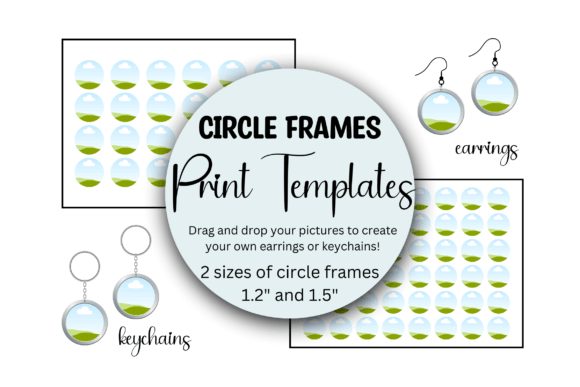
At its core, this resource is a pair of drag-and-drop Canva templates. It’s not a font, but it functions as a crucial piece of design assets for anyone working in product creation. The visual characteristic is its simplicity: a clean, organized layout of perfect circles on a standard sheet. The personality is efficient and utilitarian. Its overall appeal lies in its directness—it does one job and does it well. You get two distinct templates. One is arranged to print twenty-four 1.5-inch circles, and the other holds forty-eight 1.2-inch circles, both optimized for an 8.5" x 11" sheet. This thoughtful sizing covers the most common needs for jewelry and accessory blanks.
The real-world value is immediate. Imagine you’re a designer creating a line of botanical-themed earrings. Instead of manually placing each image and worrying about alignment, you open the template, drag your floral artwork into each circle frame, and export. The result is a sheet ready for your sublimation printer, with every circle perfectly spaced and sized. This consistency is vital for professional-looking products, whether you’re selling online or at a local craft fair. It transforms the production phase from a hurdle into a seamless step.
Integrating Templates into Your Creative Workflow
Understanding where this tool fits is key to leveraging its strength. It excels in the space between digital design and physical output, making it invaluable for several audiences.
- For Entrepreneurs and Small Business Owners: This is a production accelerator. When you receive an order for custom keychains, you can fulfill it quickly and reliably. The templates ensure every item in a batch is identical, upholding your brand’s standard for quality and consistency. This professionalism directly influences customer perception and brand identity.
- For Crafters and Hobbyists: It democratizes the creation process. You can turn personal photos, digital artwork, or licensed designs into polished accessories without advanced software skills. The ease of use encourages experimentation, letting you test new designs with minimal risk or wasted materials.
- For Designers and Content Creators: Think beyond finished products. Use the templates to create mockups for your portfolio or social media graphics. Showing your artwork presented on a realistic earring or keychain mockup can be a powerful marketing tool, helping clients visualize the end result.
The influence on your workflow touches on several key areas. It enhances visual hierarchy in your production process by clearly defining the print area. It supports brand perception by enabling consistent output. Most importantly, it improves audience engagement by allowing you to offer more custom, high-quality physical products efficiently.
Practical Guidance for Using Your Circle Templates
Getting the most from the Circle Frames Print Templates- 2 Sizes involves a few practical considerations. First, evaluate your project’s fit. Measure your physical blanks. A 1.2-inch circle is ideal for smaller studs or delicate pendants, while a 1.5-inch circle offers more space for detail and is perfect for keychains or statement earrings. Matching the template size to your blank is non-negotiable for a clean finish.
Next, consider your imagery. High-resolution files are essential for sharp printing. The template works with any image, but for the best results, especially with sublimation printing, your artwork should be vibrant and detailed. Think of each circle frame as a mini canvas for editorial design or packaging design principles—composition and clarity matter even at a small scale.
When preparing your file, remember that these are print templates. The design is meant to be functional. Use Canva’s alignment tools to ensure your images are centered perfectly within each frame. After dropping in your pictures, save the file as a high-quality PDF or PNG for the sharpest print output. This step preserves the integrity of your design, ensuring the circles remain perfectly round and crisp when transferred to your substrate.
Finally, think about commercial use. The templates themselves are a tool to create end products. If you are selling the finished earrings or keychains, you are clear to do so. Always ensure any artwork you place inside the frames is either your own creation, properly licensed, or used within the terms of its license for commercial sale. This due diligence protects your business and respects other creators’ work.
In practice, this set of templates is less about aesthetic flair and more about empowering production. It’s a behind-the-scenes asset that supports your creative vision by handling the technical precision of layout. For anyone regularly producing circular printed items, it’s a straightforward investment that pays dividends in saved time, reduced waste, and a more polished final product. It’s a perfect example of a practical design asset that solves a common problem with elegant simplicity.